Shure RMCE-BT2 and Westone ES50

I have had the Westone ES50 custom in ear monitors for a while but have been using a pair of Airpods Pro for their convenience lately. Today I got the Shure RMCE-BT2 blue tooth adapter cable for MMX connector style headphones and it has breathed new life into my ES50s. Not having to use an adapter, and a different adapter, when using these with my iPhone X or iPad Pro is a game changer for me. The sound is rich and I don’t feel I’m missing anything from the cabled option. These produce more than adequate volume for me using this fairly sensitive in ears. I hated in ears before getting my ES50s as I could never get a good fit they would always fall out. This has been the case with the Airpod Pros although I’ll still use them for some of their features and convenience. The Shure RMCE-BT2 have 8 hours of battery life, though I’ve not had them long enough to judge other reviewers have said this is about accurate, and report the battery level audibly and to the battery widget on the iPhone X and iPad Pro. I was able to pick these up on sale for $50 while they retail for $150. Even at full price I’d recommend them. The Westone ES50 retail for $1000 and sound amazing. If you can’t find a universal fit in ear but would like the convenience I’d highly recommend the ES line from Westone.

Choosing a Bluetooth Controller

SN30 and SN30 Pro next to 2018 iPad Pro 12.9″

I decided to keep my SN30 controller rather than going with the SN30 Pro from 8 BitDo. I mainly play ported games on my iPad but if you do have need for the added buttons of the SN30 Pro I would go with the SN30 Pro+ instead for the added grip when using the thumb sticks.

8 BitDo SN30 Pro+

8 BitDo also has software for remapping that only works with the Pro+ model. With both controllers I was not able to add them as you would a normal Bluetooth device on the iPad Pro. Instead I had to go through System>Accessibility>Switch Control>Switches>Bluetooth Devices… to add the controllers. You can connect the controller by holding start and a together to go into pairing mode going into the above menu and then connecting it. You only have to go through the menu once and then you can connect it after that by just holding start and a. The buttons on the controller feel nice and are responsive and the controller works well with the iPad. I would highly suggest going with the Pro+ model though for the extra $5 given its added accessibility with the software and the added comfort with the grips. I’ll be carrying the SN30 in my bag for the form factor but using the SN30 Pro+ at home.

Samsung Portable SSD T5

The Samsung T5 Portable SSD is my choice for mass storage for my iPad Pro. It’s also how I transfer files around from my PC to my iPad. Its fast and from all accounts including my own very reliable. The drive itself comes with both the cables for using type c to type c and type c to type a connections. So no matter if you are using a computer with type c or not it has you covered. Being a type c connection on the drive was important for me not just for speed but durability as well. This is not an inexpensive drive at an msrp of $250 street price closer to $150 but I think if you look into it you’ll find this is the best option for speed size and convenience. It really is amazing how small this thing is.

Pocket Size Charger

I was a little torn on what to write about next but I really like this little charger I found for the iPad Pro. It’s really tiny, type-c, and 30 watts so it’s perfect for a travel charger for the iPad Pro. The prongs fold away and it fits with my other items in my accessories bag. Anker is a company I have had many chargers from and I trust them. Its even not to badly priced at $34.99 at the time of writing so it could be a good alternative to the apple branded charger which is $49.00.

ultra thin

Folding Keyboard

Today I want to go over my favorite iPad accessory other than the apple pencil. This folding keyboard has really impressed me giving a great typing experience while packing up to a very small size. That keyboard is the iclever IC-BK05. I tried the mini size IC-BK03 first but I had one issue with it that made me decide to go with the full size backlit version.

The problem that I had with the mini size version is that the backspace key is not in the same position as it is on a full size keyboard so when I switched back and forth I had to adapt every time. The size of the keyboard wasn’t as much an issue as I was able to get a feel for that pretty simply. However not having the “\” key between the enter and backspace key made me miss type for a bit every time I would switch from my desktop computer or full size keyboard I use at home for the iPad to the folding keyboard.

While I don’t use the backlight on the larger keyboard, it was worth getting the larger one for the typing experience for me. If you were just using this keyboard all the time and were not constantly switching back and forth it may not be an issue for you. The keys have a satisfying travel and feel on both so I would recommend them. The battery life for both is said to be somewhere around 300 hours with the backlight off but only 6-8 hours with it on so I would for sure run it without. Overall this is an amazing accessory for under $50 and I think combined with a good folio case works much better than any of the “folio keyboard” cases for its versatility and use.

Whats in my EDC bag

overview of whats in my bag

So I have a pretty small every day carry bag that primarily consists of my 2018 iPad Pro 12.9 inch 256 GB, a folding keyboard from iclever and a smaller bag holding cables and accessories.

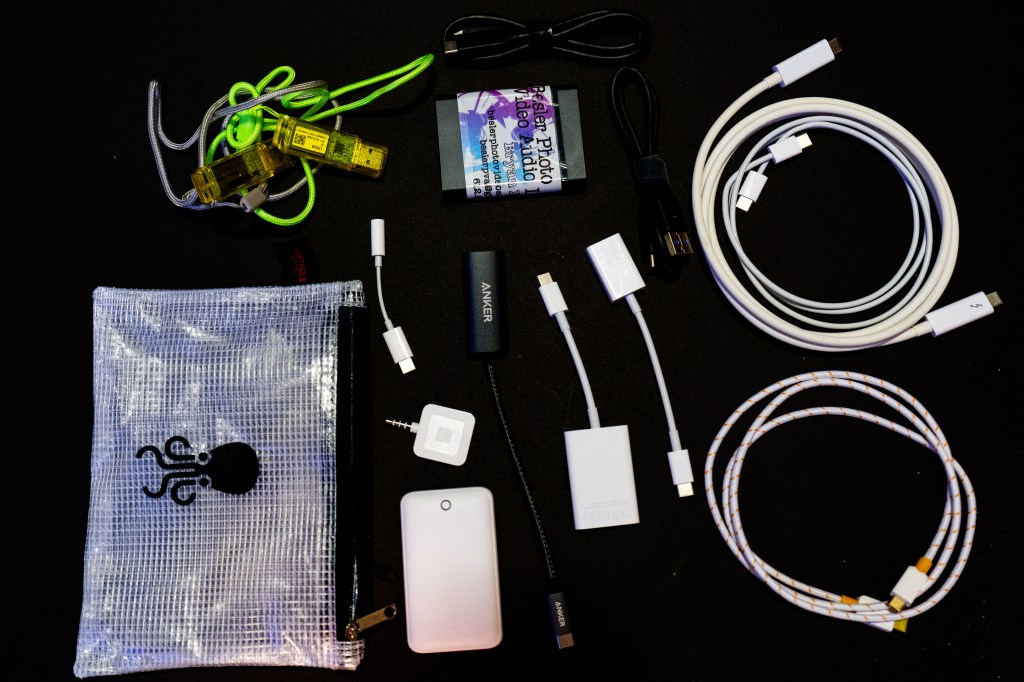
whats in the cables and accessories bag

In my cables and accessories bag I keep: a couple thumb drives, a Samsung T5 1 TB USB-c SSD, a couple USB-c cables, a headphone adapter, HDMI adapter, SD card reader, USB a to c adapter, square card reader, and power adapter. I will go over these items in more detail over the next few posts. Including what apps I use on the iPad Pro, mainly for productivity, as well as the accessories that I use.

edit: Leave a comment on what item you are interested in me going over in the next post.

Coming Next Week!!!

Starting next week I will be posting on this blog Monday, Wednesday and Friday about tech related topics. Specifically I will be talking about the digital conversion I have made from analog forms of media such as note taking, photography, videography, and sound. I will be looking at some of the ways that this change has impacted my life starting with how I am becoming more productive through digital media as a content creator.